
Top 5 CMMS Software to Replace Excel Maintenance Tracker in 2026
Leading CMMS Software to Replace Excel
Find the right platform to move beyond Excel and build a more organized, connected maintenance process.
Table of Contents
If your maintenance team is still using Excel to track equipment, preventive maintenance, work orders, and maintenance history, you may have reached the point where a CMMS makes more sense. A good CMMS gives your team one place to manage assets, schedule maintenance, assign work, record completed jobs, and monitor maintenance performance without depending on multiple spreadsheets.
Excel can work well for a small maintenance operation. But as the number of assets, technicians, work orders, and preventive maintenance tasks grows, keeping everything accurate becomes increasingly difficult. That is why many maintenance teams are looking for CMMS software to replace Exce
In this guide, we compare five CMMS software to replace Excel. We look at what each platform offers, who it is best suited for, and what to consider when moving from an Excel maintenance tracker to dedicated maintenance management software.
Why Are Maintenance Teams Moving Away From Excel?
Excel is flexible, familiar, and inexpensive. That makes it an easy starting point for maintenance teams.
The problem is that Excel is primarily a spreadsheet tool, not a maintenance management system.
A maintenance manager may have one spreadsheet for assets, another for preventive maintenance schedules, another for spare parts, and separate files for work orders or technician reports. As the operation grows, keeping these files synchronized becomes a job in itself.
Common problems include:
- Missed preventive maintenance schedules
- Difficulty tracking open and completed work orders
- Incomplete equipment maintenance history
- Multiple versions of the same spreadsheet
- Limited visibility for maintenance managers
- Manual reporting and KPI calculations
- Difficulty accessing maintenance information in the field
- Poor visibility into spare parts usage and availability
The bigger issue is that Excel usually requires people to remember what needs to happen next.
A CMMS changes that workflow. Instead of simply recording maintenance information, the system can help teams schedule, assign, track, and document maintenance activities from one central platform.
How Do You Know You've Outgrown Excel for Maintenance?
You don’t necessarily need to replace Excel just because you’re managing maintenance with spreadsheets. The better question is whether Excel is creating more work than it saves.
You may be ready for a CMMS if:
Your preventive maintenance schedule keeps growing
When you have dozens or hundreds of recurring PM tasks, manually checking dates becomes difficult. A CMMS can automatically create recurring maintenance tasks based on schedules, frequencies, or other maintenance requirements.
Technicians spend too much time on paperwork
If technicians have to return to a computer to update spreadsheets after every job, important information can be delayed or missed.
Mobile CMMS applications allow technicians to access work orders, update task status, add notes, and record maintenance information from the field.
You can't quickly answer basic maintenance questions
A maintenance manager should be able to answer questions such as:
- Which assets are breaking down most often?
- What maintenance is due this week?
- Which work orders are overdue?
- How much did we spend maintaining an asset?
- Which spare parts are being used most frequently?
If answering these questions requires searching through multiple Excel files, a dedicated maintenance management system can make a significant difference.
Asset history is scattered
An asset’s maintenance history becomes much more useful when all inspections, repairs, work orders, parts, and maintenance records are connected to that asset.
This is difficult to maintain consistently when information is spread across spreadsheets.
What Should You Look for in an Excel Replacement?
Not every CMMS will be the right replacement for your maintenance spreadsheets.
Before choosing one, look for capabilities that address the specific problems you currently have.
A practical Excel replacement should ideally provide:
- Asset and equipment management
- Preventive maintenance scheduling
- Work order management
- Maintenance history
- Mobile access for technicians
- Parts and inventory management
- Maintenance dashboards and reports
- User roles and permissions
- Notifications and reminders
- Integrations with other business or industrial systems
For manufacturing and industrial organizations, it can also be valuable to consider IoT connectivity, condition monitoring, and AI capabilities if you want to move beyond basic maintenance tracking over time.
Best CMMS for CMMS Software to Replace Excel
- Fogwing CMMS – Best for manufacturing and industrial teams replacing Excel with centralized asset management, preventive maintenance, IoT, and AI-powered maintenance capabilities.
- Fabrico – Best for teams moving from spreadsheets to structured digital workflows for work orders, preventive maintenance, assets, and inspections.
- Limble CMMS – Best for growing maintenance teams managing preventive maintenance, work orders, assets, parts, and maintenance requests.
- UpKeep – Best for mobile maintenance teams that need field-based work order management, preventive maintenance, and asset tracking.
- ClickMaint – Best for small and mid-sized teams looking for a straightforward CMMS for asset management, maintenance scheduling, work orders, and reporting.
A Closer Look at Top 5 CMMS Software to Replace Excel
1. Fogwing CMMS
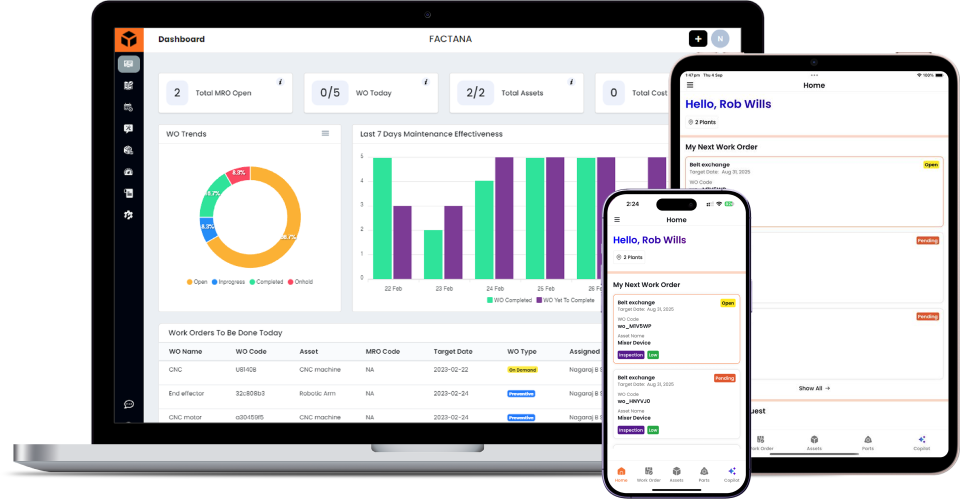
Fogwing CMMS helps manufacturing, industrial, and facility teams move from spreadsheet-based maintenance to a centralized system for managing assets, work orders, preventive maintenance, parts, and maintenance workflows.
For organizations that want to go beyond basic maintenance tracking, Fogwing can also connect maintenance management with Industrial IoT, condition monitoring, and AI capabilities.
What It’s Great For
Manufacturing and industrial teams looking to centralize maintenance operations while creating a path toward connected and data-driven maintenance.
Key Features
- Asset and equipment management
- Preventive maintenance scheduling
- Work order management
- Maintenance planning
- Parts and inventory management
- Mobile maintenance
- Maintenance dashboards and reporting
- AI-powered maintenance assistance
- Industrial IoT integration
- Condition monitoring
Who’s It Best For?
Manufacturers, industrial plants, facilities, and maintenance teams replacing Excel with a more connected maintenance management system.
2. Fabrico
Fabrico helps maintenance teams move from spreadsheets and manual processes to a structured digital maintenance workflow.
The platform brings core maintenance activities such as work orders, preventive maintenance, asset management, inspections, and maintenance requests into one system.
What It’s Great For
Maintenance teams looking to simplify day-to-day maintenance workflows and replace spreadsheet-based tracking with a structured digital process.
Key Features
- Work order management
- Preventive maintenance
- Asset management
- Maintenance requests
- Inspections
- Maintenance reporting
- Mobile access
Who’s It Best For?
Maintenance teams transitioning from spreadsheets or manual processes that need a straightforward way to organize daily maintenance activities.
3. Limble CMMS
Limble CMMS provides a centralized platform for managing preventive maintenance, work orders, assets, parts, and maintenance requests.
For teams moving away from Excel, it brings maintenance tasks, asset information, responsibilities, due dates, and completion records into a structured workflow.
What It’s Great For
Growing maintenance teams that need an organized CMMS for managing recurring maintenance and day-to-day work orders.
Key Features
- Preventive maintenance scheduling
- Work order management
- Asset management
- Maintenance reporting
- Parts management
- Mobile maintenance
- Maintenance request management
Who’s It Best For?
Maintenance teams that have outgrown spreadsheets and need a structured system for organizing preventive and corrective maintenance.
4. UpKeep
UpKeep takes a mobile-focused approach to maintenance management, allowing technicians to access maintenance information and update work from the field.
This makes it relevant for teams where technicians spend much of their time working directly around equipment, facilities, or other assets rather than at a desktop.
What It’s Great For
Maintenance and facilities teams that prioritize mobile access, field-based work orders, and technician workflows.
Key Features
- Work order management
- Preventive maintenance
- Asset management
- Mobile maintenance
- Inspections
- Parts and inventory
- Maintenance reporting
Who’s It Best For?
Organizations where technicians need to create, receive, update, and complete maintenance tasks from mobile devices.
5. ClickMaint
ClickMaint provides core CMMS functionality for teams looking to move maintenance activities from spreadsheets and manual processes into a centralized system.
It brings asset information, preventive maintenance, work orders, scheduling, parts, and reporting together in one maintenance platform.
What It’s Great For
Small and mid-sized maintenance teams looking for a straightforward system to organize preventive maintenance and work orders.
Key Features
- Asset management
- Preventive maintenance
- Work order management
- Maintenance scheduling
- Parts management
- Maintenance reporting
- Mobile access
Who’s It Best For?
Small and mid-sized maintenance teams that need a dedicated CMMS for organizing assets, maintenance schedules, work orders, and maintenance records.
For manufacturing and industrial organizations managing complex maintenance operations, Fogwing CMMS brings centralized maintenance management, multi-site asset visibility, preventive maintenance, and connected equipment data into one platform. Its combination of CMMS, Industrial IoT, condition monitoring, and AI capabilities helps teams standardize maintenance workflows while moving toward more proactive, data-driven equipment management.
How to Move From Excel to a CMMS
Moving from Excel doesn’t have to mean transferring every spreadsheet row manually on day one.
A better approach is to start with the information your maintenance team actually needs.
1. Clean your existing maintenance data
Remove duplicate assets, outdated equipment, incorrect part numbers, and unnecessary spreadsheet columns.
2. Build your asset list
Create a reliable master list of equipment and assets. Include information such as asset name, location, manufacturer, model, serial number, and criticality where relevant.
3. Import preventive maintenance schedules
Move recurring maintenance activities into the CMMS and define their frequency, tasks, instructions, and responsible team members.
4. Digitize work orders
Replace spreadsheet-based job tracking with structured work orders.
Each work order should clearly show the asset, task, priority, technician, status, and completion information.
5. Train technicians
The system only works if technicians actually use it. Keep the initial workflow simple and make sure technicians understand how to receive, update, and close work orders.
6. Start measuring maintenance performance
Once your maintenance data is centralized, you can begin tracking metrics such as:
- Preventive maintenance compliance
- Mean time to repair
- Mean time between failures
- Work order backlog
- Equipment downtime
- Maintenance costs
This is where moving from Excel becomes more than simply replacing one tool with another.
Excel vs CMMS: Which Is Better for Maintenance?
Excel is still useful for simple lists, analysis, and ad-hoc calculations. It isn’t inherently a bad tool.
The difference is that Excel requires your maintenance team to manage the process manually, while a CMMS is designed around the maintenance process itself.
| Capability | Excel | CMMS |
|---|---|---|
|
Asset tracking |
Manual |
Centralized |
|
PM scheduling |
Manual |
Automated/recurring |
|
Work orders |
Spreadsheet-based |
Structured workflow |
|
Maintenance history |
Manual records |
Asset-linked history |
|
Technician access |
Limited |
Mobile options |
|
Notifications |
Manual |
Automated |
|
Reporting |
Manual |
Built-in dashboards |
|
Parts tracking |
Spreadsheet-based |
Integrated inventory |
|
IoT integration |
Limited |
Available on selected platforms |
|
AI capabilities |
Limited |
Available on selected platforms |
So, when should you stop using Excel for maintenance?
Usually, when spreadsheets are no longer simply helping your maintenance team but are becoming the thing your team has to constantly maintain.
If you’re missing PM schedules, losing maintenance history, struggling to track work orders, or spending too much time preparing reports, it may be time to move to a CMMS.
Final Thoughts
Replacing Excel isn’t really about finding a better spreadsheet.
It’s about giving your maintenance team a system that can organize assets, schedule maintenance, manage work orders, capture maintenance history, and make maintenance information available when it is needed.
For a small operation with only a few assets, Excel may still be enough. But once maintenance becomes difficult to coordinate, a CMMS can provide the structure that spreadsheets lack.
Among the five platforms covered here, Fogwing CMMS is particularly worth considering for manufacturing, industrial, and facility teams that want to go beyond basic maintenance tracking and build a more connected, AI-powered maintenance operation
The right time to move from Excel is not when your spreadsheet becomes completely unusable. It’s when your maintenance team is spending more time managing the spreadsheet than managing maintenance.
FAQs
1. What is CMMS software, and how is it different from Excel for maintenance management?
A CMMS centralizes assets, work orders, preventive maintenance schedules, inspections, parts, and maintenance records, whereas Excel typically requires teams to manage these processes manually across spreadsheets.
2. What are the best CMMS software options for replacing Excel in 2026?
The right CMMS depends on the organization’s requirements, such as asset complexity, number of facilities, mobile maintenance needs, preventive maintenance workflows, integrations, and scalability. Options covered in this article include Fogwing CMMS, Fabrico, Limble CMMS, UpKeep, and ClickMaint.
3. What features should manufacturers look for in a CMMS?
Key features include asset management, preventive maintenance, work order management, maintenance scheduling, inventory and parts management, mobile access, reporting and dashboards, integrations, and support for connected equipment or condition monitoring where required.
4. Can CMMS software support maintenance across multiple manufacturing facilities?
Yes. Many modern CMMS platforms support centralized asset and maintenance management across multiple locations. When evaluating a system, manufacturers should consider multi-site visibility, standardized workflows, user permissions, reporting, and the ability to manage different facilities from a centralized platform.
5. How do I choose the right CMMS software for my maintenance team?
Start by identifying your current maintenance processes, number of assets and sites, preventive maintenance requirements, technician workflows, reporting needs, integrations, and future scalability. Comparing these requirements against each CMMS’s capabilities can help determine which platform fits your operation.